

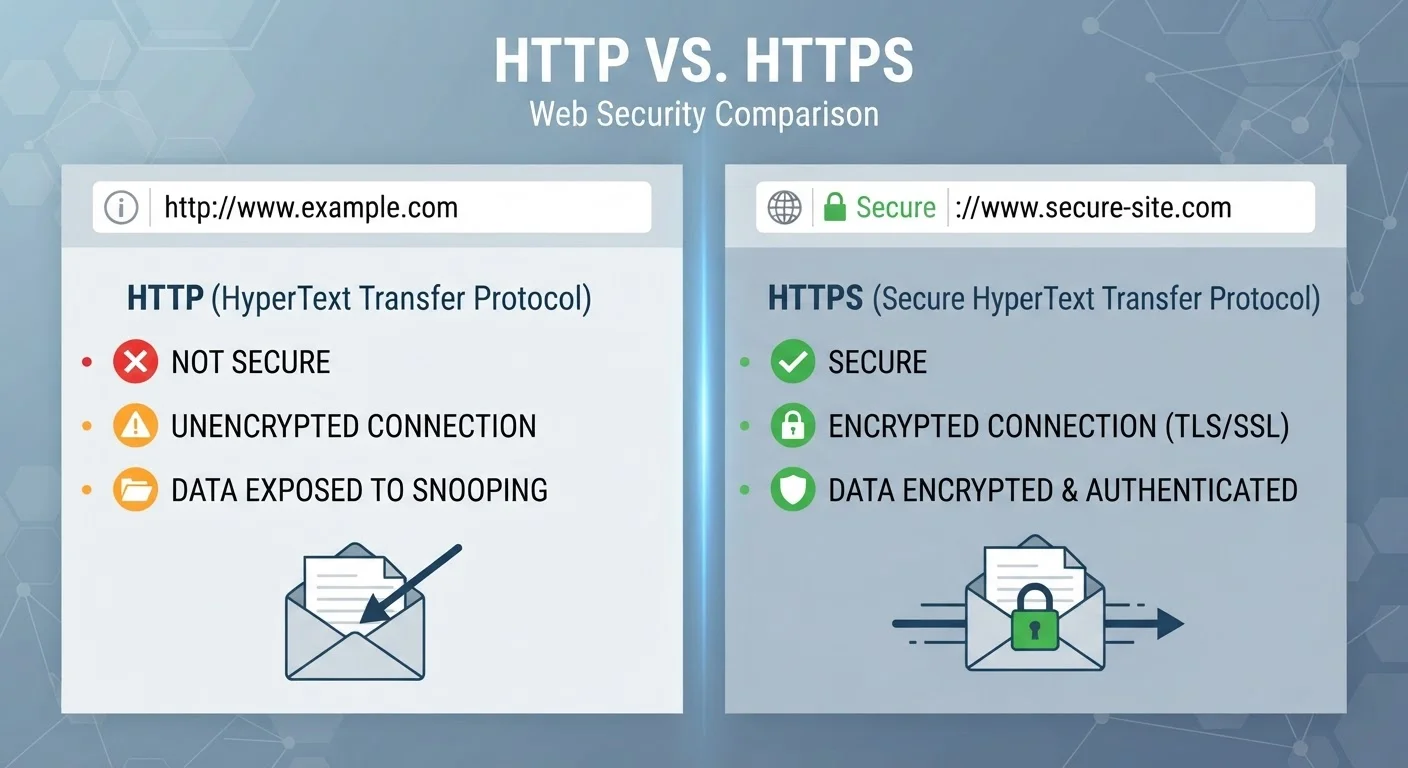
What HTTP and HTTPS Actually Do
HTTP stands for HyperText Transfer Protocol - the foundational set of rules that governs how data moves between your browser and a web server. When you type a web address and hit Enter, HTTP is the language your browser and the server use to exchange information.
The critical problem: HTTP sends everything in plain text. Any data traveling between you and the site - your username, password, or credit card number - is readable by anyone positioned between you and the server. On a public Wi-Fi network, that could be a nearby stranger with basic software tools.
HTTPS adds a layer called TLS (Transport Layer Security, formerly known as SSL) on top of HTTP. TLS establishes an encrypted tunnel between your browser and the server, scrambling data so that interceptors see only unintelligible characters rather than your actual information.
The padlock icon in your browser's address bar signals that this encrypted connection is active. It also confirms that a trusted certificate authority has verified the server's identity - meaning you're actually connected to the site you intended to reach, not an impersonator.
| Criterion | HTTP | HTTPS |
|---|---|---|
| Data encryption | None - plain text | TLS encryption in transit |
| Padlock in browser | No | Yes |
| Identity verification | None | Certificate authority verified |
| Safe on public Wi-Fi | No | Much safer |
| Protects against phishing | No | No |
| Protects server-side data | No | No |
| Browser warning shown | Yes, on modern browsers | No warning |
| Standard for modern web | No - legacy only | Yes |
Where HTTPS Still Leaves Gaps
The padlock is meaningful - but it's easy to overread what it promises. Understanding its limits is just as important as knowing what it provides.
HTTPS does not guarantee a site is trustworthy. Anyone can obtain a TLS certificate, including operators of phishing sites. A fraudulent site designed to steal your login credentials can display a padlock just as legitimately as a bank's website. The padlock only tells you the connection is encrypted - not that the destination is honest.
HTTPS does not protect data once it reaches the server. If a company's database is breached, encryption in transit offers no defense. Your data may be encrypted on its way there but stored insecurely on the other end.
HTTPS does not prevent malware. Downloading a malicious file over an HTTPS connection is just as dangerous as downloading it over HTTP - the encryption covers the channel, not the content.
Certificates Don't Equal Credibility
TLS certificates - the technology behind HTTPS - can be obtained for free by anyone running a website, including bad actors. Certificate authorities verify that a domain owner controls that domain, not that the organization is legitimate or reputable. Always scrutinize the full web address, especially on pages that ask for login credentials or payment information. When in doubt, navigate directly to the site by typing the address yourself rather than clicking a link.
For a fuller picture of what security tools actually protect - and where they fall short - see common online safety myths that give everyday users a false sense of security.
Practical Guidance: What to Look For and Do
In practice, most reputable websites have adopted HTTPS by default, and major browsers like Chrome and Firefox flag HTTP sites with a warning - particularly when a page includes a form or login field. That warning is worth heeding.
Here's what to keep in mind when browsing:
- Never submit sensitive information over HTTP. If a site asking for a password, payment, or personal details doesn't show a padlock, leave the page.
- Check the full domain, not just the padlock. Phishing sites use names like secure-bankname-login.com - the padlock won't warn you about a misleading domain.
- Use HTTPS on public Wi-Fi. Unencrypted public networks are the environment where HTTP is most dangerous. HTTPS significantly reduces interception risk there.
- Pair HTTPS with strong account security. Encryption in transit is one layer. Two-factor authentication adds another that protects you even if your password is exposed.
You can also learn more about how supplemental tools like VPNs complement HTTPS - and where their protections differ - to make smarter decisions about your overall privacy setup.
95%+
Web traffic now loaded over HTTPS
Google's Transparency Report has tracked HTTPS usage in Chrome consistently above 95% of page loads in the United States in recent years.
~83%
Phishing sites using HTTPS
The Anti-Phishing Working Group has reported that a large majority of phishing sites now use HTTPS, illustrating that a padlock does not indicate a trustworthy site.


