

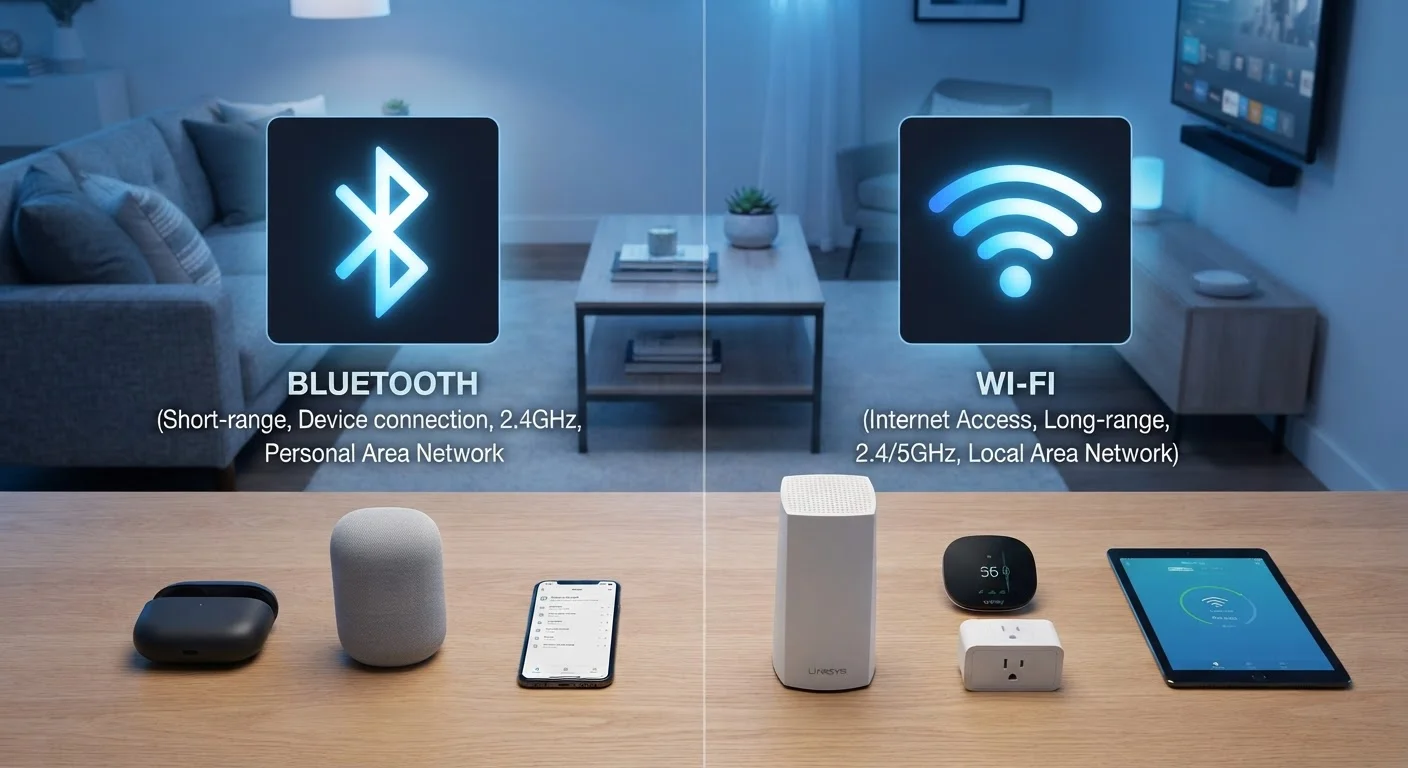
Two Radios, Two Very Different Jobs
Almost every smartphone, laptop, and smart speaker manufactured today contains two separate wireless radios operating at the same time - one for Bluetooth, one for Wi-Fi. They look similar from the outside: both are invisible, both cut the cord. But they were designed to solve fundamentally different problems, and understanding that distinction makes it far easier to set up, use, and troubleshoot your devices.
Bluetooth was created for short-range, device-to-device communication. When you put on wireless headphones, the audio travels directly from your phone to the earbuds - no router involved, no internet required. The link typically works reliably within about 30 feet, and Bluetooth's modest data rate is perfectly sufficient for audio, keyboard input, or syncing a fitness tracker.
Wi-Fi, by contrast, is your home's internet access layer. Your router acts as a hub; devices connect to it and, through it, to the broader internet. Wi-Fi is engineered for bandwidth - the ability to move large amounts of data quickly - which is what video streaming, file downloads, and video calls depend on. For context on the different flavors of Wi-Fi and what those version numbers and frequency labels actually mean, see our plain-English router guide.
| Criterion | Bluetooth | Wi-Fi |
|---|---|---|
| Primary purpose | Device-to-device personal links | Internet access across the home |
| Typical indoor range | ~30 feet | Up to 150+ feet (router dependent) |
| Maximum data speed | ~2 Mbps (Bluetooth 5.0) | Hundreds of Mbps to Gbps |
| Frequency band | 2.4 GHz only | 2.4 GHz and 5 GHz |
| Requires a router | No | Yes |
| Power consumption | Low (BLE: very low) | Higher |
| Ideal device types | Headphones, keyboards, wearables | TVs, laptops, cameras, phones |
| Number of paired connections | Typically 1-7 active devices | Dozens of devices simultaneously |
Where Each Technology Shows Up Around Your Home
Once you know what each radio is optimized for, it's easy to recognize which one is at work in everyday situations.
Bluetooth in practice
- Wireless headphones and earbuds - direct audio link to your phone or laptop
- Keyboards and mice - low-latency input without a USB dongle
- Smartwatches and fitness bands - syncing step counts and heart-rate data to a companion app
- Smart home accessories - door locks, light bulbs, and sensors using Bluetooth Low Energy (BLE), a variant designed to draw minimal power from small batteries
Wi-Fi in practice
- Smart TVs and streaming sticks - pulling video data from the internet at high speed
- Laptops and phones - general internet access for browsing, email, and calls
- Smart speakers and displays - fetching news, weather, and music from cloud services
- Security cameras - continuously uploading video footage to cloud storage
Many devices use both at once. A smart speaker may use Wi-Fi to fetch a song from a streaming service and Bluetooth simultaneously to connect to a nearby paired device. Your phone is almost always connected to both radios at the same time. If you use wireless headphones, those typically run over Bluetooth while your phone stays on Wi-Fi for data.
~30 ft
Typical Bluetooth indoor range
Bluetooth's effective range drops further through walls and in environments with many competing 2.4 GHz devices.
2 Mbps
Peak speed of Bluetooth 5.0
This is sufficient for audio and small data syncs, but far below what video streaming or large file transfers require.
79 channels
Bluetooth frequency-hopping channels
Bluetooth cycles rapidly through 79 sub-channels within the 2.4 GHz band to reduce interference from Wi-Fi and other devices.
The Interference Problem and How to Work Around It
Both Bluetooth and Wi-Fi operate in the 2.4 GHz radio band - the same slice of spectrum. When you have many Bluetooth devices paired nearby while your router is also broadcasting on 2.4 GHz, they compete for the same airspace. This can cause audio dropouts on Bluetooth headphones or sluggish Wi-Fi speeds.
The practical fix is straightforward: if your router supports it, connect bandwidth-hungry devices like laptops and TVs to the 5 GHz Wi-Fi band instead. The 5 GHz band doesn't overlap with Bluetooth's frequency, which eliminates most cross-technology interference. Bluetooth devices themselves handle congestion through a built-in technique called frequency hopping - the radio rapidly switches among 79 different channels within the 2.4 GHz band to avoid sustained collisions.
If you've noticed your Wi-Fi underperforming, interference is just one of several possible causes. Slow Wi-Fi has many culprits, from router placement to network congestion, and it's worth examining the full picture. You should also make sure your home network is secured properly - most routers ship with settings that leave them exposed, and a few targeted changes meaningfully reduce your risk.
When Devices Use Both Radios Simultaneously
It's common for a single device to run Bluetooth and Wi-Fi at the same time without any conflict. Your phone might stream music over Bluetooth to a speaker while simultaneously receiving data over Wi-Fi - the device manages both radios independently. Manufacturers build in coexistence logic to minimize the interference between the two, so in most cases you don't need to choose one or the other.
Range, Speed, and Power: The Practical Numbers
The technical differences between Bluetooth and Wi-Fi translate into real-world trade-offs that affect which technology belongs in which role.
Range: Standard Bluetooth reaches roughly 30 feet indoors; walls and interference reduce it further. Wi-Fi routers can cover an entire house - hundreds of feet with mesh systems. If a device needs to communicate from room to room or floor to floor, Wi-Fi is the right choice.
Speed: Bluetooth 5.0, the version common in devices made after roughly 2017, reaches theoretical speeds around 2 Mbps - adequate for audio and small data syncs, but nowhere near what streaming or downloads demand. Wi-Fi 6 (802.11ax), the current mainstream standard, can reach several gigabits per second under ideal conditions. Even older Wi-Fi 5 routers easily deliver hundreds of megabits per second - orders of magnitude more than Bluetooth.
Power consumption: This is where Bluetooth wins decisively. Standard Bluetooth draws far less power than Wi-Fi, and Bluetooth Low Energy (BLE) is even more efficient - small coin-cell batteries can power BLE sensors for a year or more. Wi-Fi radios consume significantly more energy, which is why laptops and phones show a measurable battery benefit when Wi-Fi is switched off. For the bigger picture on how your home gets its internet in the first place, see our comparison of fiber vs. cable internet.


